A Simple Guide to Home Internet Networks

FTTH vs. FTTN vs. HFC

Home internet has scaled quickly to keep up with our evolving technology needs—multi-device households, content creation, working and video conferencing from home and gaming, to name a few. Perhaps you’ve been under the impression that there’s one right choice when it comes to home internet network type.

The truth is, the best home internet depends on a number of different factors, and network type is just one of them. Home internet providers like Xfinity that operate a fiber-rich network are able to meet the needs of many real-world scenarios, comparable in performance to fiber providers—and in some cases, with better availability, features or value.

Short Answer: Fiber-to-the-home (FTTH) and fiber-to-the-node (FTTN) or hybrid fiber-coaxial (HFC) are different network designs, and both can deliver fast, responsive home internet. What you experience depends on the plan, your equipment, your home WiFi and what is available at your address.

Last Updated 

Xfinity Article 1 Hero   Simple Guide

Network Architecture 101

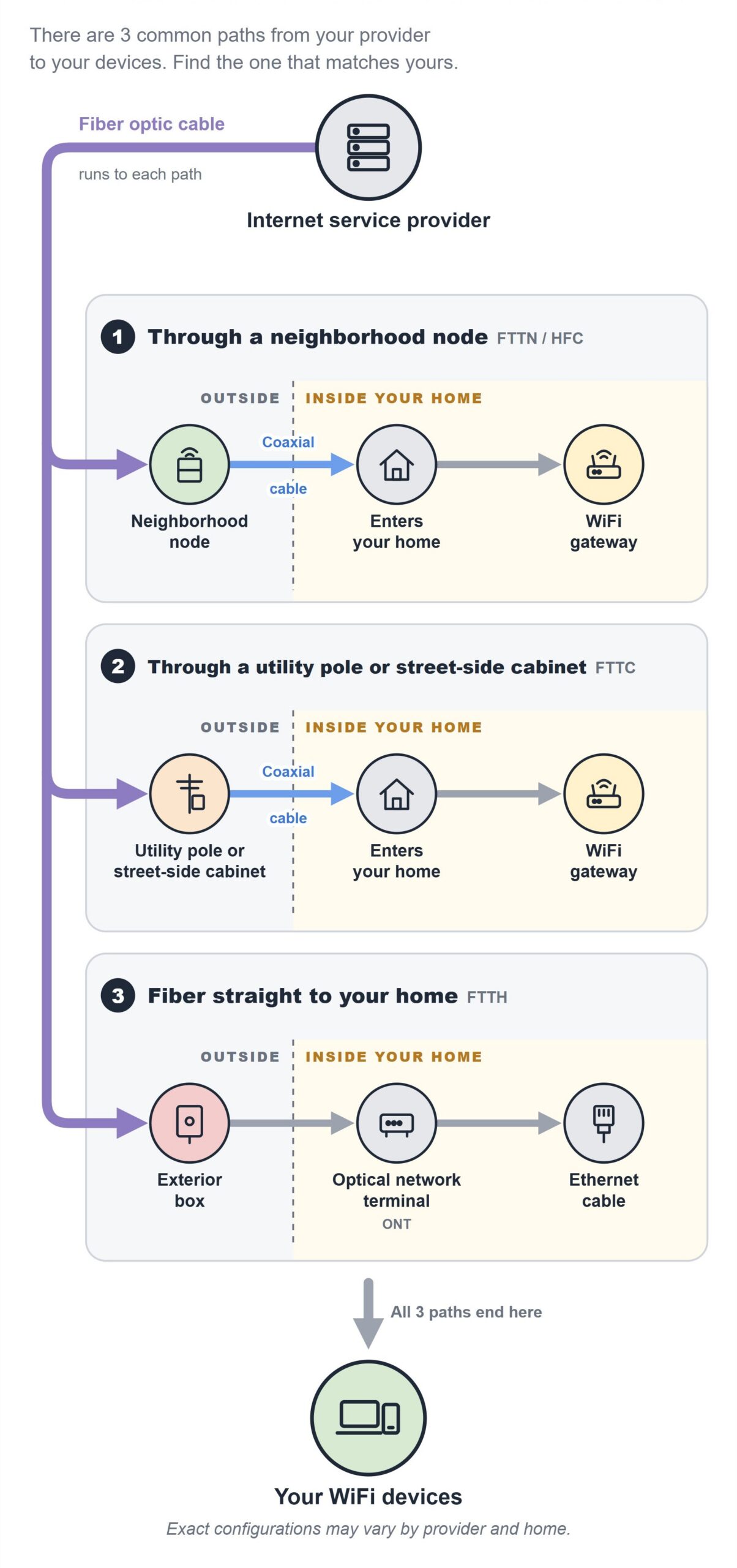
You might have seen acronyms like FTTH, FTTN or HFC used to describe internet network types. These acronyms, grouped under “FTTX” or fiber-to-the-x, describe the different ways that internet is delivered from the provider to your home—also known as network architecture:

FTTH Fiber-to-the-Home Optical fibers run from the provider’s location directly to a box on the outside wall of a home.
FTTP Fiber-to-the-Premises A broader term used interchangeably with FTTH, but it also covers buildings that contain multiple living spaces, like apartment complexes.
FTTN Fiber-to-the-Node Fiber cables run to a central neighborhood hub, where the signal is continued to the home via another connection type, such as coaxial cables.
FTTC Fiber-to-the-Curb Fiber runs closer to the user than with FTTN, stopping at a utility pole or street-side cabinet before secondary cables complete the delivery to the home.
HFC Hybrid Fiber-Coaxial A network infrastructure that combines fiber optic cables and coaxial cables. Fiber runs from the provider to a local neighborhood node and coaxial cables handle the final connection into the home or building.

Most frequently, you’ll hear the terms FTTH and FTTN. While they’re different engineering approaches, they are both capable of delivering high-performance home internet. 

It’s also important to note that while terms like FTTH and FTTN describe network architecture, and network architecture alone does not determine the quality of an internet experience.

How Internet Reaches Your Home

Within the three common connection types—FTTH, FTTC and FTTN or HFC—internet travels from the provider over high-capacity fiber optic cables, then reaches your home in one of three ways: to a neighborhood node (FTTN or HFC), to a pole or street cabinet (FTTC) or to a box outside the home (FTTH). Many providers, including Xfinity, use fiber for the “backbone” of their network because it carries large amounts of data over long distances. 

From there, Ethernet or coaxial cables typically complete the connection to the home and to the modem inside the home, although exact configurations may vary. This last leg of the network connection is known as the “last mile.” While FTTH and FTTN/HFC use different last-mile technologies to reach your home, both can support fast, responsive home internet.

For example, Xfinity’s fiber-powered HFC network architecture uses an advanced fiber optic backbone to carry the connection deep into communities, where coaxial cable completes the connection to many homes. This fiber-backed infrastructure ensures seamless streaming, gaming and working from home without interruptions. Check the latest offerings from Xfinity here.

Real-World Internet Performance

There can be a difference between advertised speeds and real-world performance, and it comes down to a lot more than which material is used in the last mile.

For everyday activities like browsing, streaming, video calls, smart-home devices and typical online gaming, many people may not notice a meaningful difference between FTTH and HFC when both are well equipped and maintained.

Network Performance

A provider marketed as fiber is not automatically the best fit for every household. In fact, a fiber-rich FTTN or HFC provider like Xfinity may offer similar everyday performance to FTTH with expanded availability, features or value.

As we discussed, FTTH and FTTN or HFC have some technical differences; however, their real-world experiences can be comparable when a plan and network meet a household’s specific needs.

Everyday Use

A well-managed FTTN or HFC service can support the same core household activities as FTTH as well. For common online activities such as browsing, streaming, video calls, smart-home use and typical online gaming, many people experience little practical difference between FTTH and FTTN or HFC when both services are well provisioned.

Upload Speeds

FTTH can support symmetrical upload and download speeds, but many users may not consistently experience the full advertised rate—especially over WiFi—since performance can be affected by the home network, router placement, equipment, device capabilities, interference, network conditions and the server or service being accessed, not just the material used for the final connection.

When Upload Speeds Matter

A plan with substantially higher or symmetrical upload speeds may be useful when a household frequently sends large files, performs continuous cloud backups or supports other upload-intensive work. These types of plans may be available from both FTTH and modern HFC providers, including Xfinity. However, it’s important to confirm availability of a specific upload tier at your address, because having a fiber or FTTH label alone doesn’t guarantee identical plan features across different providers.

Reliability & Coverage

Xfinity’s fiber-backed infrastructure delivers performance people can experience on a daily basis: fast downloads and uploads, low latency, consistency, whole-home WiFi, capacity, reliability and support. Xfinity’s plans are available nationwide, currently serving more than 65 million households and businesses with more than 99.99 percent network reliability. And according to recent Opensignal reports, Xfinity tops the charts when it comes to consistent quality—even competing head-to-head with other FTTH internet providers.¹’²

How to Get the Best Home Internet for Your Needs

The best gauge of home internet isn’t advertised speed or which material is used for the final connection. After all, customers experience an internet service, not a network diagram. What matters most is choosing a provider and a plan that delivers the right combination of speed, responsiveness, reliability, WiFi, features, availability and price.

Here’s a checklist you can use when evaluating your internet needs and choosing the best provider for you:

▢ Availability ✔ First and foremost, check provider availability at your specific address.

You can usually do this right from the provider’s website by entering your zip code.
▢ Typical Performance ✔ What are the actual upload and download speeds, latency and responsiveness at your address?

You can find this information by checking performance maps on sites like Opensignal or asking neighbors or community forums about their real-world experience.
▢ Available Plans ✔ What speed tiers are available at your address?
✔ How does the provider differentiate their plan tiers (by data usage, speed tier, etc.)?
▢ Reliability & Support ✔ What is the provider’s average downtime?
✔ How consistently does the service stay up, stable and responsive over time without unexpected drops or slowdowns?
✔ Does the connection hold steady even during busy peak hours in your neighborhood?
✔ How quickly does the provider respond during network downtime? Is the communication thorough and do they provide frequent updates during downtime?
✔ Are there convenient ways to get in touch with customer support, and are they responsive and helpful?
▢ Features & Equipment ✔ What type of WiFi equipment is available?
✔ Is there an extra fee for any necessary equipment?
✔ Does the provider offer optional equipment such as WiFi boosters or range extenders to ensure a consistent connection throughout your home?
✔ What security features does the provider offer?
✔ Are there any other features offered that would be useful for your needs, such as service bundles, etc.?
▢ Installation ✔ What type of installation is needed for the service at your address?
✔ Is self-installation possible, and how complicated is the process?
✔ If not, is there an additional fee for professional installation?
▢ Pricing & Fine Print ✔ Lastly, what is the cost of the plan tier that best meets your household’s needs?
✔ Does the provider offer a price guarantee to lock in your pricing for a certain period of time?
✔ Do you have to commit to a contract? If so, for how long?

Finding the best home internet depends most importantly on your day-to-day needs. From there, provider availability is paramount, as is assessing real-time performance, instead of taking advertised speeds at face value.

If you’re considering multiple providers, keep in mind that the strongest comparison is between a provider’s available plans and actual performance at your specific address, not between labels, marketing or theoretical performance.

brand logo

9.9

9.9

Get Fast Internet For $45/mo For 5 years

FAQs

Fiber-to-the-home, or FTTH, carries fiber optic internet directly to the home. Fiber-to-the-node, or FTTN, carries fiber to a nearby node in the neighborhood and uses another connection, such as coaxial cable, for the final segment to the home.

This architectural difference can affect available upload and download tiers, but by itself does not determine the quality of a customer’s day-to-day internet experience.

No, not automatically. FTTH and FTTN (or HFC) use different network designs, but both can deliver fast, responsive, reliable home internet. 

For common activities like streaming, browsing, video calls, gaming and smart-home devices, many people experience little practical difference when both services are well provisioned. It’s important to compare the actual plans and performance available at your address.

Yes. Xfinity uses a fiber-rich hybrid fiber-coaxial (HFC) network in most markets. Fiber carries traffic deep into communities, while coaxial cable completes the connection to many homes. In select areas, Xfinity offers fiber-to-the-home.

When it comes to choosing the best internet for your needs, you should compare Xfinity alongside FTTH providers using the same criteria: plan speeds, responsiveness, reliability, WiFi, features, availability and price.

Methodology

The Consumer Rating Difference

Behind Our Best Internet Provider Ratings

We make choosing the best internet provider easy with expert reviews and rankings.

Here’s the methodology behind our ratings:

icon

Comprehensive Overviews

From preferences to pricing & more, we cover all you need to know about internet service providers in our detailed reviews.
icon

Pricing Details

We break down how much the internet plans costs, noting everything that’s included for the different price points.
icon

Internet Provider Comparisons

With so many different internet providers available, it can be hard to decide which one is right for you. We compare different brands based on your preferences.
icon

FAQs

In case the review wasn't enough to, we also include several FAQs to help ensure you have all you need to make an informed decision.

Trusted & Secure

Trusted & Secure